Flexible Meal Planning with ZenZen
ZenZen is a mobile app that helps expecting mothers monitor their carb intake and blood sugar levels. This project focuses on redesigning the meal planner for effortless tracking.

About ZenZen
ZenZen Pregnancy Guide (https://zenzen.me) is a mobile app designed to support expecting mothers in their pregnancy journey by providing nutrition guidance, health tracking, and personalized meal planning tailored to different pregnancy needs.

My Role
UX/UI Design Intern
Project Duration
2 months
Team
2 UX/UI Designers, 1 Developer, 2 Stakeholders
Context
Pregnant women diagnosed with gestational diabetes must carefully monitor their carb intake to maintain stable blood glucose levels. Fluctuations in blood sugar can lead to complications for both the mother and the baby, making precise meal tracking essential for maternal health.
In this case study, I showcase how we redesigned the meal planner of the ZenZen mobile app to empower users to plan meals effortlessly, ensuring they stay within their daily carb intake goals while maintaining a balanced diet.
My Key Contributions

Collaborated with my design teammate and explored meal planning feature improvements.

Conducted surveys to validate our assumptions about the challenges in meal planning and carb tracking.

Brainstormed, created and presented prototypes to gather feedback and assess technical feasibility.

Drove adoption of analytics to measure the impact of redesigning the meal planning feature.
Results
Meal Logs
155 meal logs were recorded within three weeks of the redesign, providing foundational engagement data.
Multi-course meal
20% of logged meals included multi-course options, highlighting the diversity in meal planning preferences.
Analytic Tracking
The newly implemented analytic system enables data-driven decision-making for future improvements.
Quick view of final mockups post redesign


How it all began
Stakeholders sought improvements to the meal planning feature in the app to drive better user interaction.
My fellow design intern and I began by understanding the current interaction. Users could plan meals in advance or daily, depending on their preference.
The app had a working meal planner
The app allowed users to add recipes to six meal slots: breakfast, morning snack, lunch, afternoon snack, dinner, and evening snack. These meal slots align with a recommended diet plan for managing gestational diabetes.
However, the meal planner still had significant room for improvement.
Identifying the gaps and translating them into redesign goals

A visual highlighting meal planning challenges
Pain points
Limited meal flexibility
Users could only plan single-course meals
Manual carb calculations
Users had to calculate carb values themselves when they adjusted a portion size
Excessive scrolling for carb progress
This made monitoring carb intake harder throughout the day
No meal status insights in the planner
Users couldn't quickly identify which meals were consumed or skipped to inform future meal planning.
Redesign Goals
Better meal customization
Add multiple courses to a meal for better customization
Automate carb calculations
View carb values automatically, eliminating manual carb calculations when portion sizes are adjusted.
Effortless carb progress tracking
View carb intake progress effortlessly with a fixed carb progress indicator
Smarter meal planning
Reference past consumed and skipped meals to plan smarter and more effectively
Insights
A stakeholder insight revealed that a multi-course meal is common across cultures, reinforcing the need for enhanced flexibility.
The user survey confirmed strong preferences for multi-course meal structures
User Research Insights
To validate our assumptions, I surveyed participants with gestational diabetes to assess meal tracking habits, carb counting challenges, and feature preferences.
77.8% found manually calculating carb values challenging.
66.7% emphasized the importance of tracking daily carb intake goals.
66.7% preferred multi-course meal planning.
44.4% manually calculated carbs.

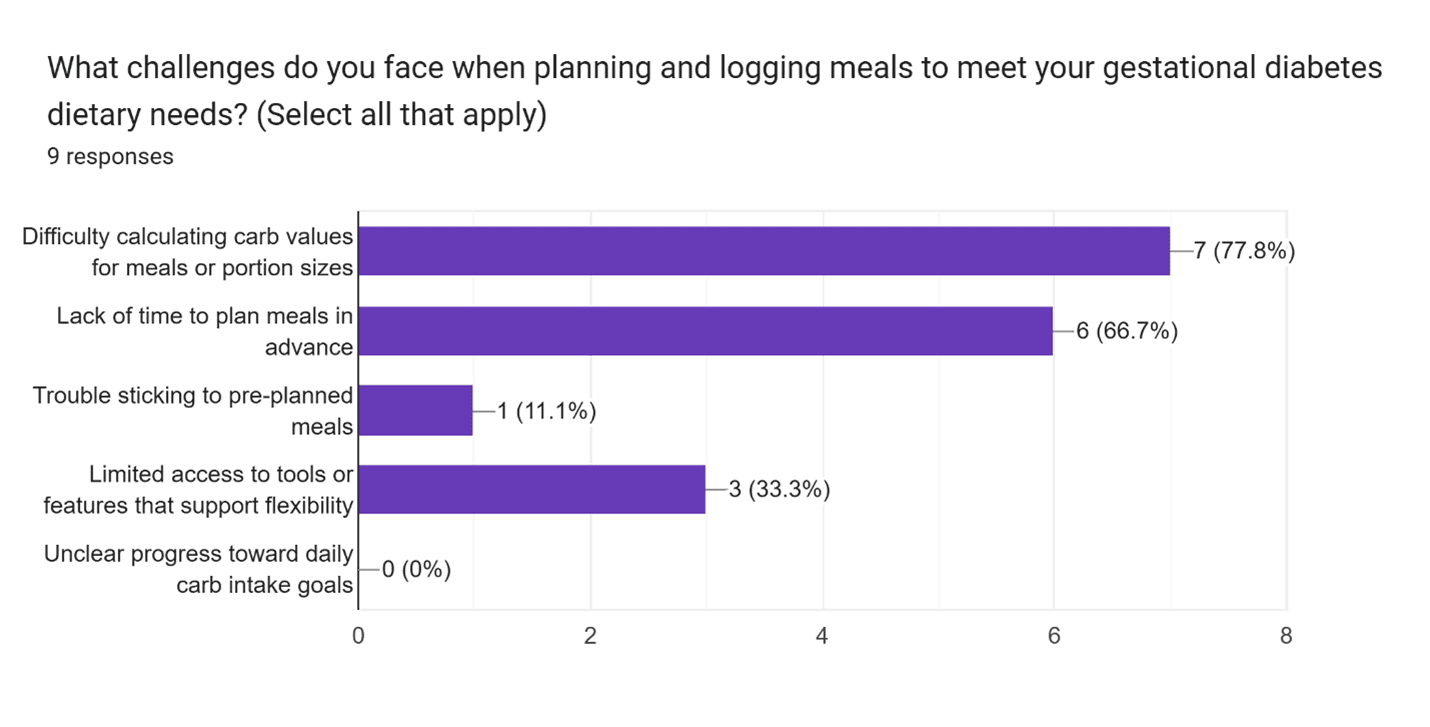
Image illustrating survey results
Design Decisions
After defining our redesign goals, we developed wireframes and interactive prototypes for various design solutions, then presented to the team for review.
Multi-course meal planning - A game-changing feature
Before
Users could only plan single-course meals, limiting flexibility.
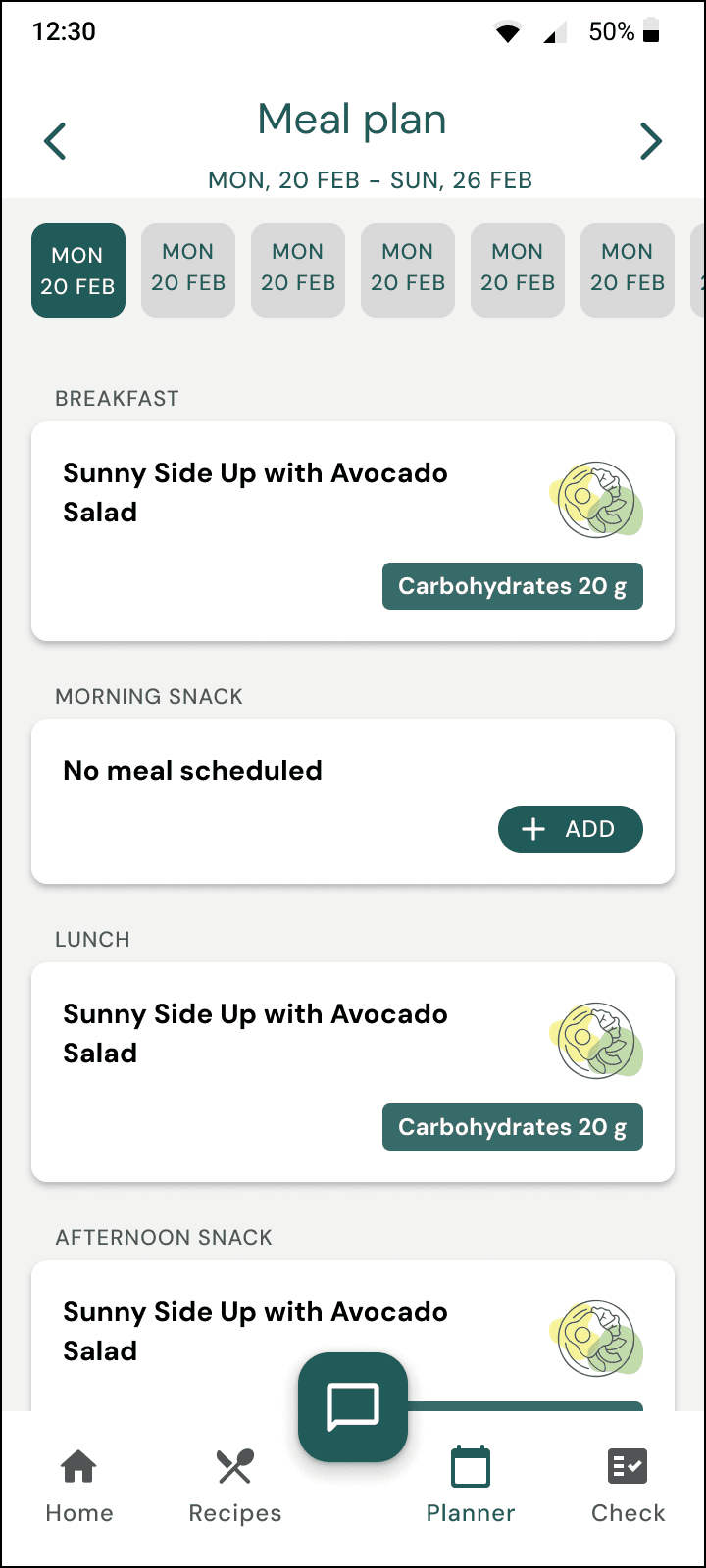
Planner Screen - Before
After
The planner now supports multi-meal structuring, allowing users to add main dishes, side dishes, and desserts seamlessly.

Planner Screen - After
After deciding to support multi-course meal planning, the challenge was to design intuitive solutions for the planner and home screen to effectively display multi-course meal cards.
Exploring Planner Layout Options

Accordion collapsed

Accordion expanded
Accordion Option
We initially tested an expandable accordion layout in which each of the six meals in a day contained meal courses listed one below the other when expanded.
Fluid Navigation Option
Instead of nesting meal courses in an accordion, we arranged them side by side for seamless horizontal scrolling while keeping the daily meals vertically scrollable. This allows users to view all meals at a glance without extra clicks, ensuring a natural and intuitive navigation experience.

Fluid Navigation Option

Final Planner Screen
Final Decision
Horizontally scrollable meal courses, maintaining clarity and reducing clutter.
Vertically scrollable daily meals, making navigation easy
Improving Accessibility with Semantic Labels
We incorporated semantic labels for buttons and interactive elements, making navigation clearer for users relying on screen readers or assistive technologies. For example, the semantic labels for:
Three-dot menu: 'More options for [Recipe name]'
Add button: 'Add new recipe to [Meal name]'
Challenges in Multilingual Support Implementation
Multilingual UI adaptation
The app supports English and German, making it accessible to a wider audience, but some translated text didn't fit within the meal card layout in the planner.

Meal card with full words
How we solved this
We replaced the inline edit and delete icon buttons with a three-dot menu and used abbreviations instead of full words, ensuring readability and usability across languages.

Meal card with abbreviations
Exploring Meal Card Layout Options on Home Screen

Meal courses under 'Breakfast' placed next to each other
Horizontal Scrollable Option
We considered placing meal courses next to each other within the same tile in a horizontally scrollable format.
Challenge
Since the home screen already had six tiles in a row, adding more horizontally forced excessive scrolling, making navigation frustrating.

Home Screen - Before

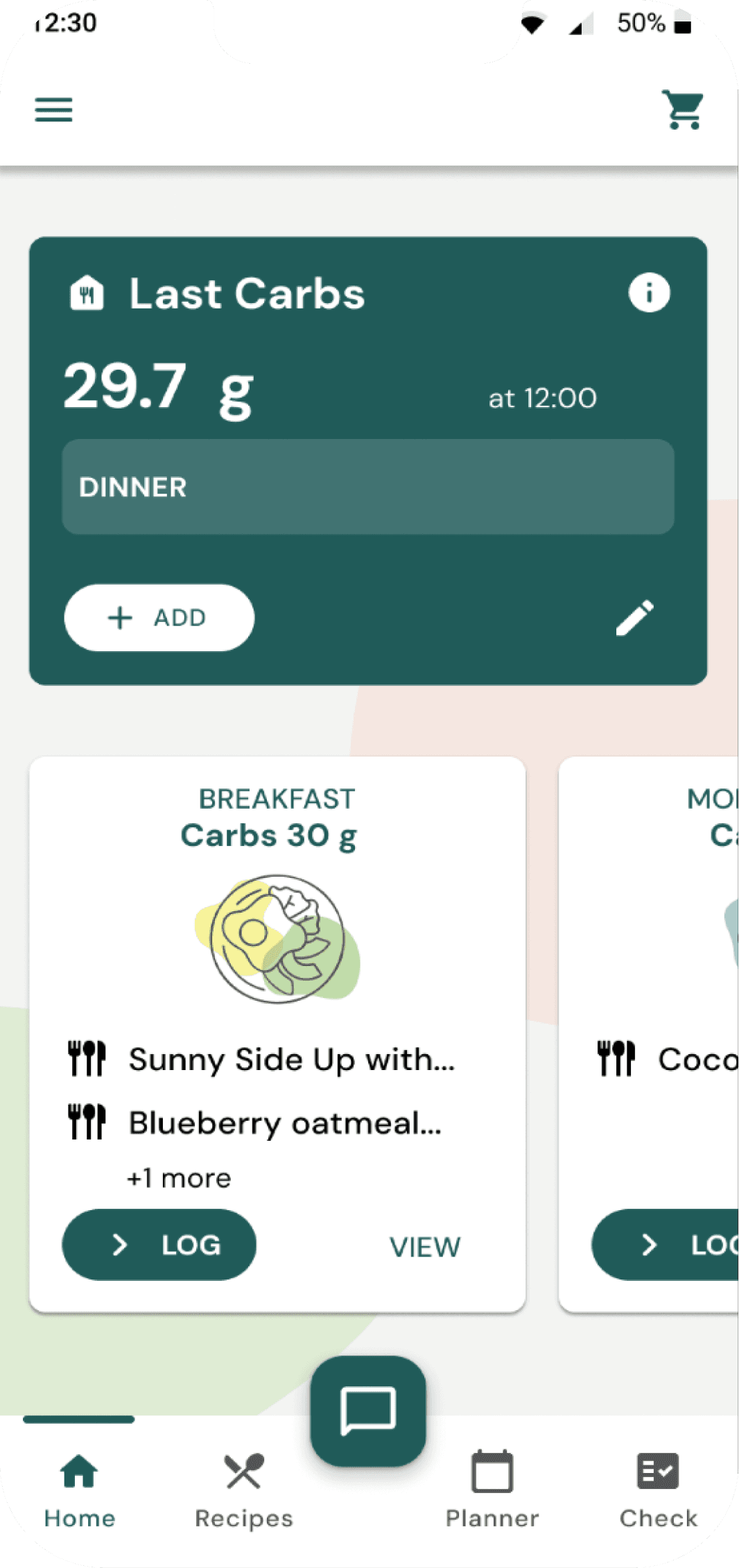
Meal courses in the home screen placed adjacent to each other
Placing meal courses adjacent to each other results in excessive scrolling, which can hinder usability

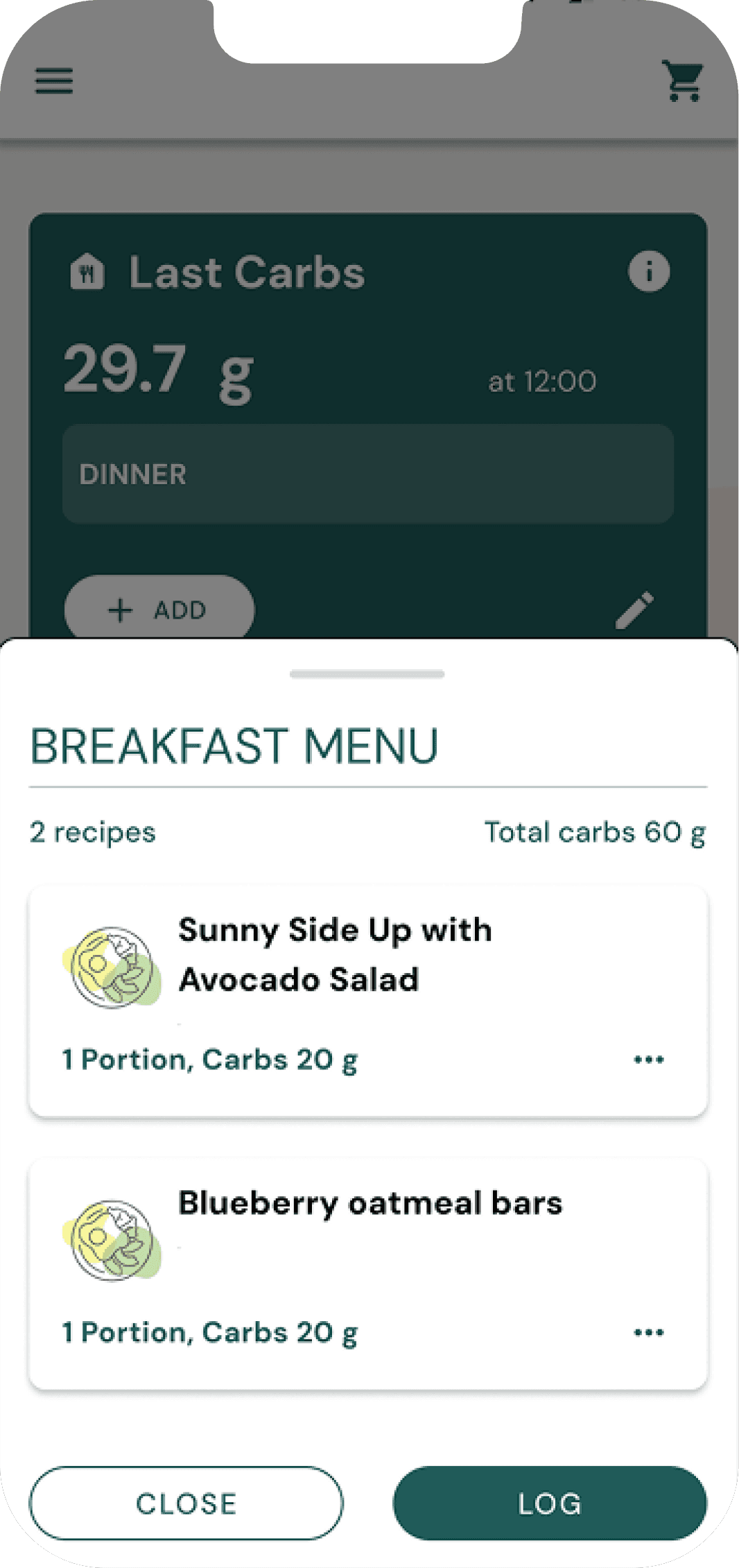
The 'VIEW' button lets users see a breakdown of their meal courses in a intuitive bottom sheet

The bottom sheet includes a 'LOG' button for logging total carbs and a 'Skip' option if plans change
How we solved this
We introduced a bottom sheet for each meal tile, stacking meal courses within the bottom sheet. This approach maintained clarity while reducing unnecessary scrolling, creating a cleaner and more accessible UI.

Home Screen - Before

Home Screen - After
Carb Progress Indicator in Planner - Making carb management more accessible
Before
The carb progress indicator in the planner was placed at the bottom, requiring users to scroll to the last meal to check progress.
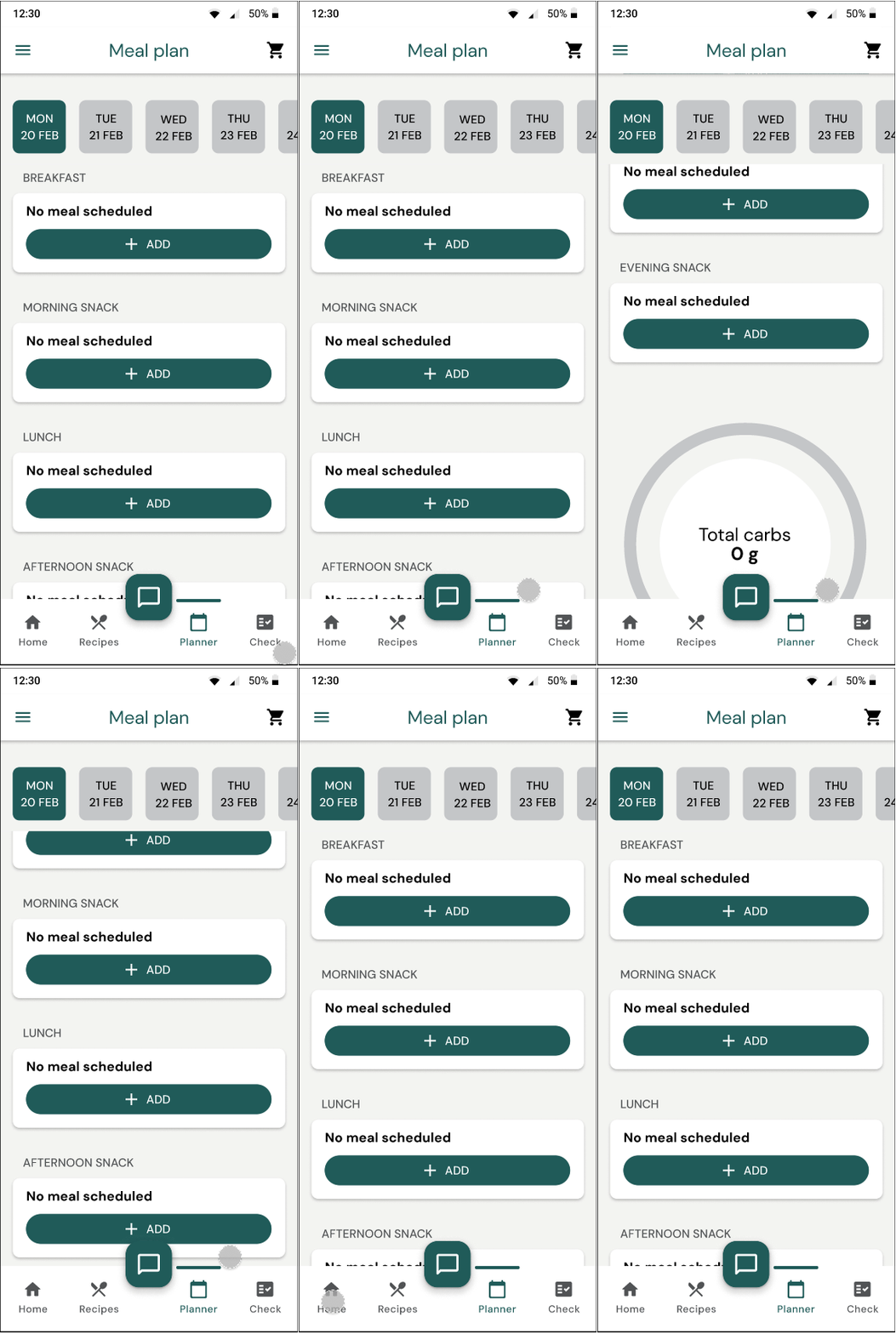

Progress in Planner Screen - Before
After
We repositioned the carb progress indicator at the top and made it fixed, ensuring it always remains visible so users could easily track their intake and plan meals accordingly.

Progress in Planner Screen - After
But our developer noted that the fixed components of the screen were occupying more than 50% of the screen space.
Final Design
Realizing this, we replaced the ring progress indicator with a horizontal bar, reducing the required space while still ensuring users could easily track their carb intake and plan meals effectively.
Accessibility for inclusive meal planning
The app provides a dialog alert when users exceed their daily providing feedback to support informed meal-tracking decisions. To reinforce this, the carb progress bar changes to red, offering a clear visual cue. Additionally, the app includes semantic descriptions for the progress bar (e.g, 'You have consumed 31g of carbohydrates out of your 160g daily goal. Your carb intake for the day is at 19%), ensuring accessibility for users with visual impairments.

Final Design - Horizontal Bar Carb Progress Indicator

Final Design - Warning Dialog when carb limit is exceeded
Automatic Carb Calculations - Reducing manual effort and minimizing errors
Before
Users had to manually calculate their carb intake whenever they adjusted portion sizes.

Before - Carb input dialog
After
Users can now enter a portion size, and the app automatically calculates the carb value, reducing cognitive load.
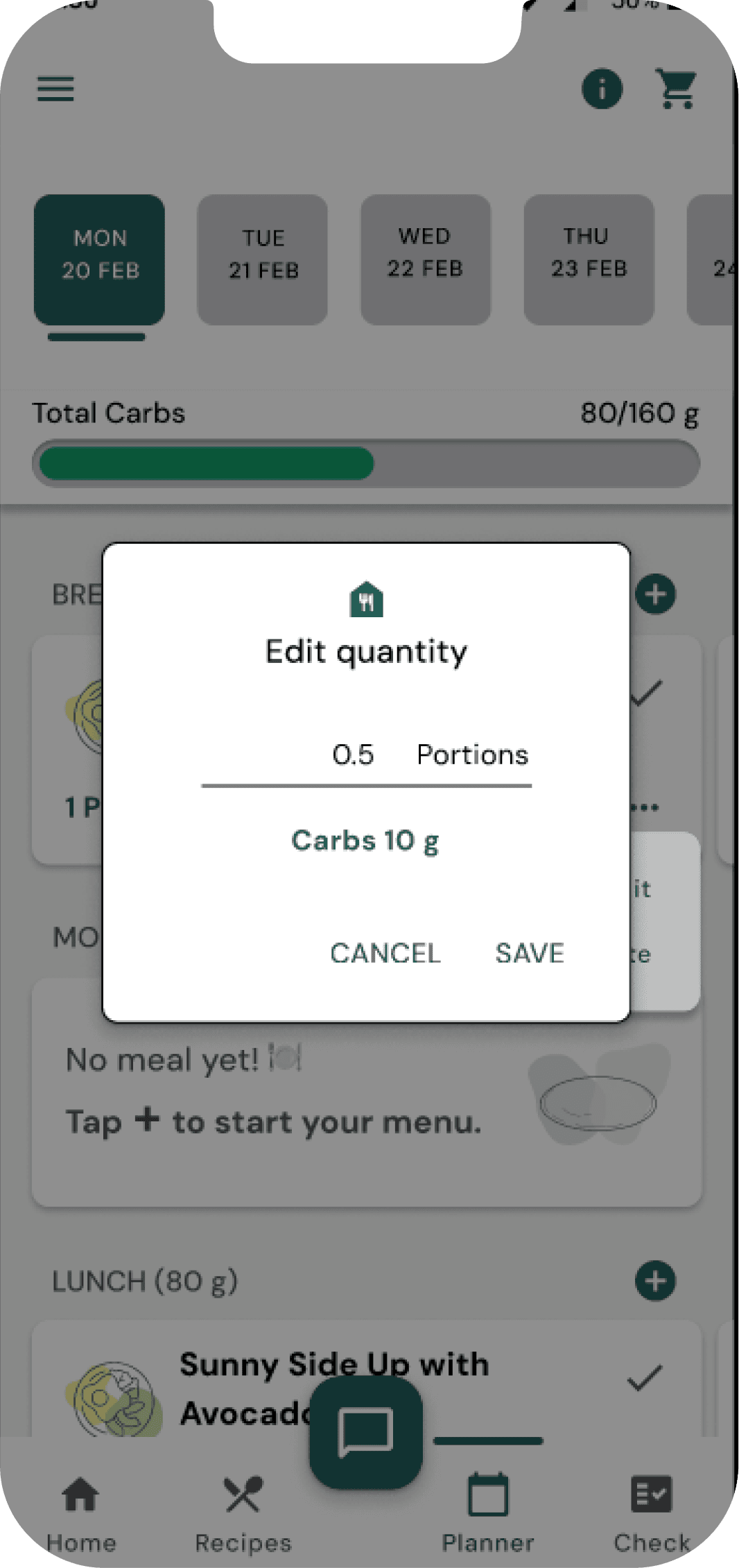
Accessibility through error handling
When users enter an invalid portion size, the app displays an error message to guide them toward a correct input. This supports cognitive accessibility for users with processing difficulties, with the error text highlighted in red for improved visual contrast.

After - Automatic carb calculation


Meal Status Indicators - Enabling users to view past choices and make more informed meal decisions
Before
Users couldn't see past consumed or skipped meals in the planner, making it hard to plan meals efficiently.

Before - No meal status
After
The meal planner now tracks meal statuses, indicating whether meals were marked as consumed or skipped. Users can view a two-week meal status history, allowing them to reference past meal choices.

Final Results
The redesign resolves prior pain points and follows UX best practices. It creates a smoother meal planning experience by allowing custom-structured meals and simplifying meal logging, reducing user effort.
We successfully balanced technical feasibility and user needs, ensuring efficient meal planning interactions.
Measuring Impact Using Analytics
Initially, the app didn't have analytics tracking, so I proposed implementing a data-driven approach to measure design impact. I identified key metrics that needed to be monitored and worked closely with developers and stakeholders to ensure technical feasibility and compliance alignment.
Below are some of the metrics we are monitoring:
Meal log completion rate: Percentage of meals successfully logged - This provides insights into habit formation and engagement.
Undo meal logging frequency: Tracking how often users reverse meal logging actions. This helps us identify potential usability issues with meal logging.
Percentage of multi-course meal logs: This can inform feature engagements and highlight meal planning preferences.
Portion size adjustments: Measuring how frequently users modify portion sizes. This can inform feature engagement and guide improvements, such as smarter portion presets for meal planning.
We will analyze user engagement trends and interaction patterns to refine the experience as meaningful data emerges. We will also be conducting usability testing to get insights into the impact of the redesign.
Conclusion
This project marked my first real-life product experience, where I had the invaluable opportunity to collaborate with designers, developers, and stakeholders to bring our design to life.
Witnessing the transformation from concept to execution was not only rewarding but also reinforced the importance of design that serves both users and business success, shaping how I approach future projects.